Write your first test in Cypress
2 min read
In this tutorial, we will cover how to write your first test in Cypress. We will go over the basic Cypress syntax and run our tests using the Cypress Test Runner.
Creating your Cypress Test
describe('Home Tests', () => {
    it('open the home page and verify the url & title', () => {
        // open the Home Page
        cy.visit('https://practice.automationbro.com/');

        // assert the url
        cy.url().should("include", "automationbro");

        // assert the title
        cy.title().should("eq", "Practice E-Commerce Site – Automation Bro");
    });
});
- to go to any URL, you can use the
cy.visit()command - Cypress also provides various types of page assertions such as
cy.url()andcy.title()to assert the URL as well as the title of the page
Running your Cypress Test in the Cypress Test Runner
To open the Cypress Test Runner, you can execute the following command below -
npx cypress open
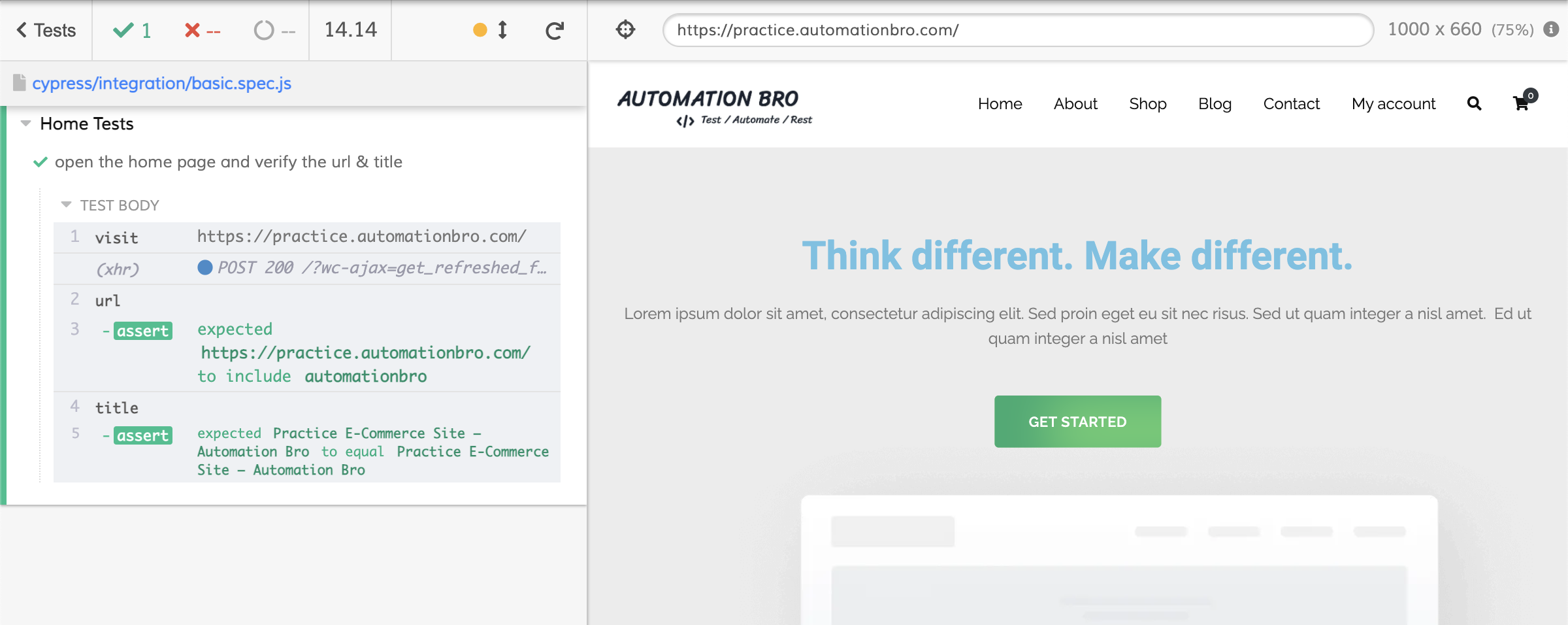
Once the Cypress Test Runner open up, you can execute your test which will show results similar to this below -
- You can see all the Cypress commands listed below such as visit, URL & title
- All your successful assertions will show in Green and failed assertions in Red
Check out the video below to see how to create your first test in Cypress –
I hope this post helped you out, let me know if you have any questions in the comments below!
Happy testing!
Want to learn more?
Check out our courses to master test automation and advance your career.
Explore Courses